

Appearance
Launchpad links
Launchpad links provide users with a seamless way to access applications from a centralized location. Instead of logging in separately to each service, users can utilize the authentication system’s launchpad to navigate between linked applications securely.
- Single-Click Access: Users can launch applications directly from the web view.
- Unified User Experience: Enhances workflow efficiency by centralizing application entry points.
- Role-Based Access Control: Ensures users only see applications they have permission to access.
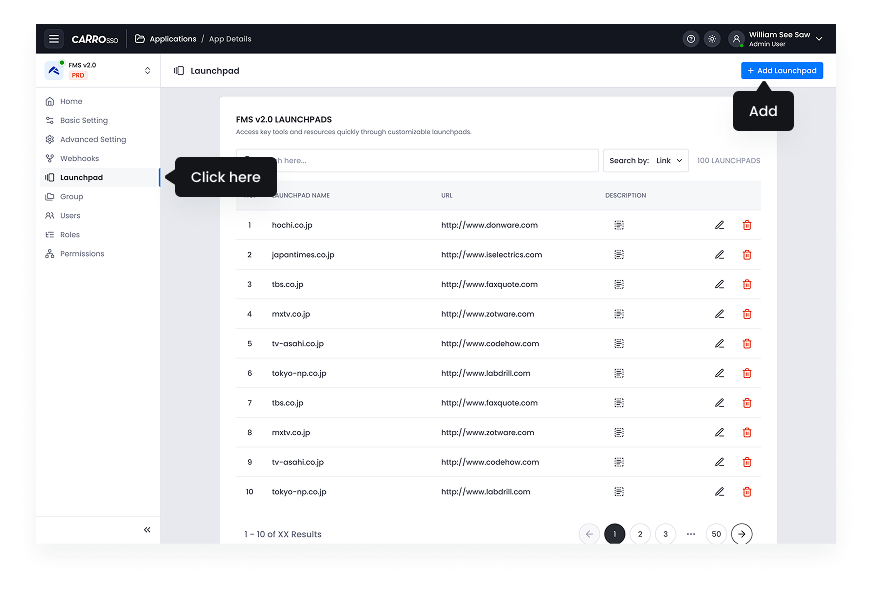
- Go to Launchpad Settings in the Application Details.
- Click add launchpad button
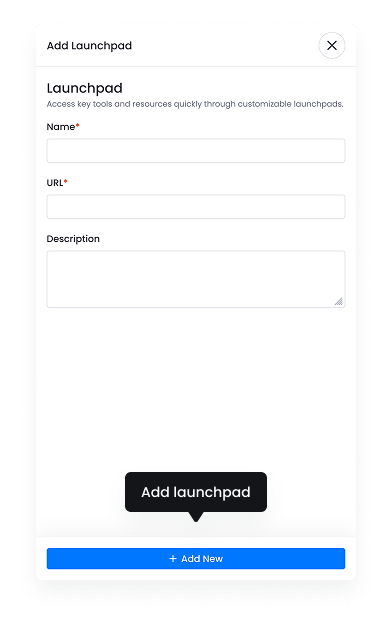
- Customize name and put URL to easy identification.
- Click add new button to put in the listing
Launchpad links simplify user navigation, providing an efficient and secure method for accessing multiple applications within an organization’s authentication ecosystem.